Cute Watercolor Elephant Graphics for Commercial Illustration Projects
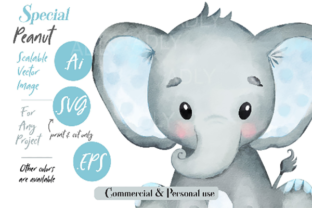
When you’re sourcing a new digital product for your online shop, the first impression is everything. Looking at this watercolor baby elephant with its distinct blue ears, the immediate mood is playful and gentle. It carries a handmade charm that feels both cute and decorative, making it perfect for audiences seeking nursery decor, baby shower items, or whimsical gifts. This isn’t a generic, slick vector; it’s an illustration with personality, leaning into a premium, artistic vibe that can elevate a simple product.
Finding Its Place in Your Product Lineup
As a seller on Etsy or platforms like Creative Fabrica, your goal is to test an asset across multiple products before committing to a full listing. This watercolor elephant, provided as SVG, EPS, and AI files, offers a versatile starting point. The SVG format, ideal for print and cut machines like Silhouette and Cricut, opens doors to precise sticker designs, planner inserts, and scrapbooking elements. The EPS and AI files allow for deep editing in programs like Illustrator or Corel Draw, letting you adapt the graphic for more complex layouts.
Think about your upcoming collection. Could this illustration anchor a themed bundle? It might shine as the central character in a set of printable wall art for a nursery, or become the hero graphic on a toddler’s t-shirt. For a crafter, it’s ready for sublimation designs on mugs, tote bags, or tumbler wraps. For the digital template seller, integrating this PNG design into a Canva template for greeting cards or social media announcements adds immediate value. It’s a commercial design asset that can be repurposed across product types without losing its core appeal.
Practical Applications for Immediate Sales
Let’s break down the real product-selling situations. Starting with physical goods, this watercolor elephant is a strong candidate for:
- SVG products: Die-cut stickers, vinyl decals, and intricate paper crafts.
- Printable designs: Framed nursery art, birthday invitation templates, and planner dashboard kits.
- Merchandise graphics: T-shirt designs (especially for baby sizes), mug illustrations, and tote bag prints.
- Sublimation designs: Full-wrap tumblers or baby bibs, where the soft watercolor texture transfers well.
For digital product creators, the asset supports:
- Digital download bundles: As part of a baby-themed clipart pack or watercolor illustration collection.
- Canva templates: Pre-made card designs or blog graphics where users can easily customize text.
- Social media templates: Promotional visuals for a handmade business focusing on baby products or maternity brands.
Enhancing Your Shop’s Professional Presentation
A graphic’s utility extends beyond the final product; it impacts how you present your entire shop. Using this watercolor elephant in your product mockups can significantly boost thumbnail appeal. A mockup showing this illustration on a clean, framed print or a nicely photographed mug creates instant visual storytelling. It builds customer trust by showing a finished, tangible item, increasing the perceived value of your digital download.
For brand consistency, if your shop leans into gentle, feminine, or handmade aesthetics, this illustration can become a recurring element in seasonal collections—think a “Baby Animal Spring Series.” It helps create a cohesive look across your listings, making your shop feel more curated and professional, which directly influences click-through potential on crowded marketplaces.
Where This Graphic Design Asset Works Best
To maximize its impact, focus on applications that highlight its artistic details:
- Large product previews: Use it prominently in mockups for wall art or large-format printables.
- Themed bundles: Pair it with complementary watercolor elements like clouds or flowers to create a richer digital product.
- Decorative layouts: In invitation or card templates, where it can be a focal point with minimal text crowding.
- Merchandise graphics: On products where the entire surface allows the design to breathe, like a full-wrap tumbler.
- Creative marketplace listings: As the hero image in your listing gallery to immediately convey the mood.
Points to Test and Potential Limitations
Every asset has areas where it should be used carefully. Before publishing, conduct these practical tests:
- Test on real mockups: Place the PNG on a mockup of a t-shirt and a mug. Does the blue ear color translate well on different backgrounds?
- Preview as a marketplace thumbnail: Scale it down to Etsy thumbnail size. Does the cute detail remain clear, or does it become a muddy blob?
- Check contrast: View it on both white and dark backgrounds. The watercolor style might fade on very dark substrates.
- Verify technical specs: For Cricut projects, inspect the SVG cut lines. Are the lines clean and continuous for a smooth cut? For printable products, confirm the file resolution is high enough for a crisp print.
Specifically, be mindful of:
- Tiny sticker details: The watercolor edges might be too soft for very small, intricate die-cut stickers, requiring simplification.
- Crowded thumbnails: In a busy listing image with multiple elements, its gentle style might get lost.
- Text-heavy templates: If you’re creating a template with lots of text areas, ensure the illustration supports the visual hierarchy without overpowering the readable content.
Final Seller Notes Before You List
Your preparation work is crucial. Organize the files clearly for your customers—label the SVG for cutting, the PNG for print, and the EPS for editing. Test a physical print to check color reproduction; watercolor blues can sometimes print cooler than expected. Pair the illustration with different font styles in a test layout: a soft script font for a feminine card, a clean sans-serif for a modern nursery print, or a playful display font for a toddler’s shirt. This helps you envision final products quickly.
Most importantly, always confirm the commercial license terms of the original asset. Once verified, this watercolor baby elephant becomes a flexible tool. It can help you build a more professional-looking online product collection by providing a high-quality, consistent visual asset. By testing it across these scenarios—from SVG products for Cricut users to PNG designs for print-on-demand—you’ll know exactly where it fits in your shop, allowing you to launch products with confidence, not guesswork.